

Every plan Fleet Lite and Fleet 25 to 500
Daily checks, defects and a repair record that cannot be edited
A driver scans the check label in the cab — with their own signed-in phone, or at a shared yard tablet — and works through the daily check for that vehicle: the eleven items of a US driver vehicle inspection report (49 CFR 396.11), or the 27 items of the UK daily walkaround check. Every item is answered on its own — there is no "all OK" button — a defect needs a description and can carry photos taken with the camera, and a check with no defects is still recorded. A check finished in under a minute, a "no defects" on a vehicle that is off the road, or a reading far from the telematics one is flagged for whoever reviews it. Never refused.
The yard tablet needs no app login. It is set up once with a key from the fleet settings, and each driver signs in by scanning their own badge, so the check is recorded under their name and marked as made at the tablet. The checklist is the same one the phone shows. The tablet signs the driver out when they tap sign out, when the next badge is scanned, or after it has been idle for a set time, and a badge that has been revoked, or a person whose role no longer allows it, cannot sign in. Viewers cannot sign in at a tablet.
A driver with no email address can use their own phone. An owner or admin adds them with a username, and sets up their phone once with a one-time QR code; the driver chooses a six-digit PIN. From then on the phone signs in only that person, by PIN, and does the same checks as the tablet. Five wrong PINs lock the phone for a while; a lost phone is switched off from Settings.
A check made where there is no signal is saved on the phone, with the time it was done, and sent the next time the app is open with signal — once, never twice. The record shows both when the check was done and when it arrived, and a check that arrived late is marked so.
An owner or admin assesses each reported defect: safe to defer, repair unnecessary, or off the road. Taking a vehicle off the road opens its repair work order and raises an alert straight away, and the vehicle shows as off road until that repair is certified — nothing else clears it. The work order cannot be completed until the person completing it certifies each defect as repaired or as not needing repair, and the next driver to check the vehicle reviews those repairs and acknowledges them before their own check is accepted.
Every step — reported, assessed, work order, certified, acknowledged — is recorded as its own entry with who and when, linked to the one before it, so a change made afterward shows. A photo is a step too: added when the defect is reported or when the repair is certified, and removable only by an owner or admin with a reason, which stays on the record with who removed it and when. Photos are reduced in size on the phone or tablet before they are sent, and the location the camera stores in the file is not kept. The database account the application runs as cannot alter or delete those entries, or the checks they came from.
- Includes
- US and UK daily check lists · per-item answers and defect descriptions · photos of the defect and of the repair · off-road control tied to the repair · certification on the repair work order · next-driver acknowledgment · a check label to print for each vehicle · a shared yard tablet with badge sign-in · vehicles not checked in 24 hours, on the board and in the summary
Problems reported between checks
A noise on the highway, a warning light at lunchtime, a mirror knocked in the yard: a driver reports it from the vehicle's page, the yard tablet or their crew phone, with photos. It becomes a defect like one found on the daily check, so it is assessed, repaired, signed off and acknowledged by the next driver in the same way.
If the driver does not think the vehicle is safe to drive, they say so, and the owners get an urgent alert. Whether the vehicle comes off the road is the manager's decision.
- Includes
- reports from the vehicle page, yard tablet or crew phone · photos · "not safe to drive" urgent alert · the same assessment, repair and acknowledgement as any defect · in Fleet Lite
Service schedules on usage counters, not just the calendar
Each asset carries its usage counters — odometer miles or kilometers, engine hours or cycles — and a maintenance task can come due on a counter interval, on time, or on whichever comes first. A schedule counts down from the reading at which it starts and restarts from the reading recorded when the service is done, so "every 10,000 miles" means ten thousand miles from the last service, not from the day the vehicle was entered.
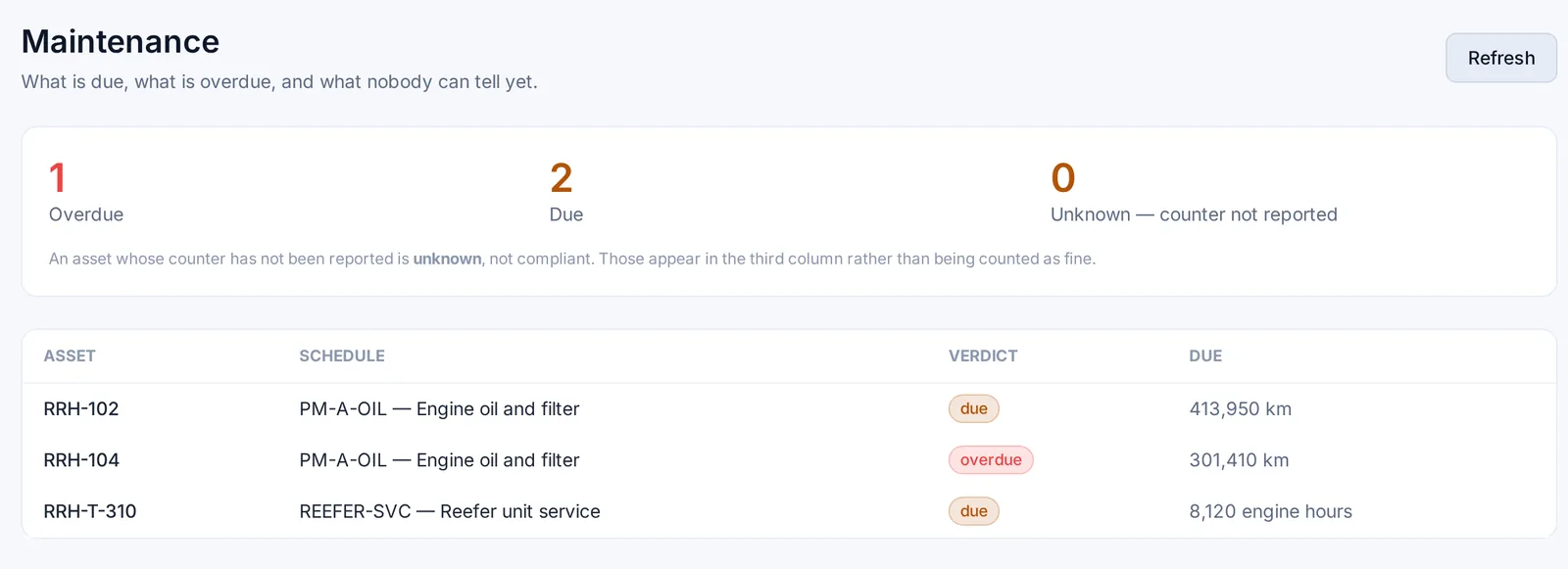
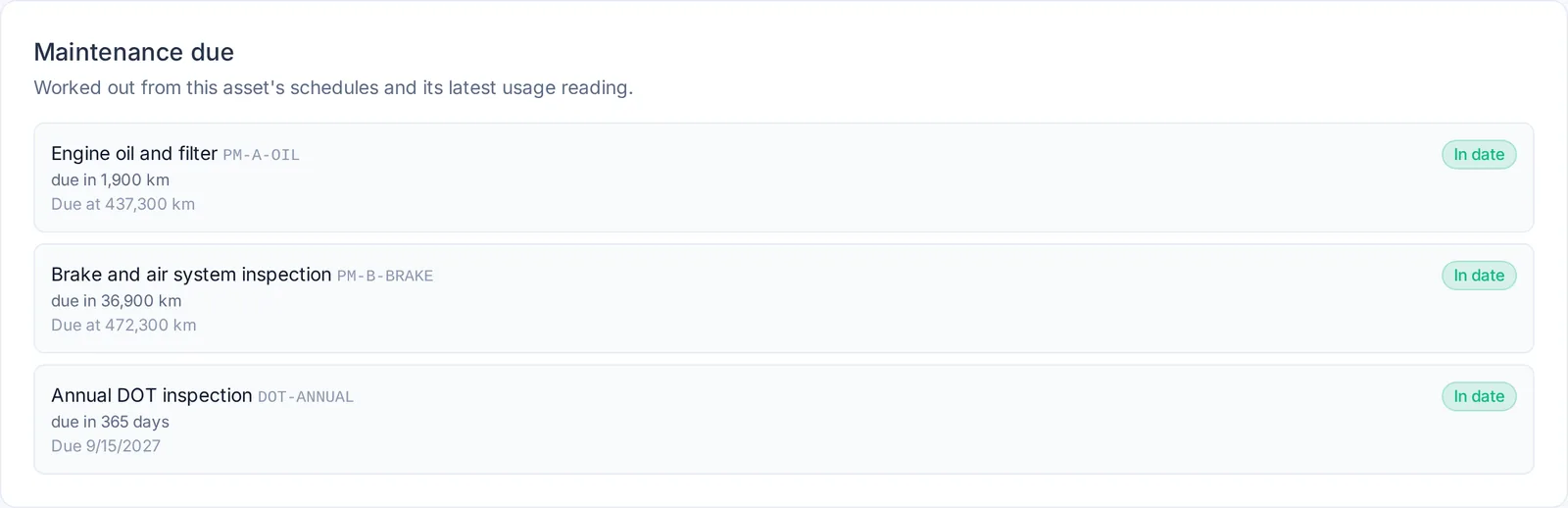
Each asset shows what is due, what is overdue, what is not yet due and what has no schedule at all. A schedule whose latest reading is more than 30 days old is shown as "can't tell", not quietly as "not due" — different answers that a single "OK" hides.
- Units
- Miles or kilometers, set for your organization; organizations in the US and the UK start in miles
- Free tool
- Preventive maintenance planner — list your vehicles and see which is due next, in your browser
Due soon, overdue alerts and one summary
A schedule shows as due soon once it is inside your lead time — by default 14 days, about 500 miles or 25 engine hours before it falls due, each set by your organization. A schedule can also allow a grace period past its due point before it counts as overdue.
When a service goes overdue, an alert is raised straight away — once per vehicle and schedule — and it clears itself when the work is recorded. Everything else comes as one summary, daily or weekly, listing what is overdue, due now, due soon, and what cannot be checked because there is no recent reading. Alerts and the summary go to the email address or webhook you set for your organization.
- Includes
- Due-soon lead times by days, distance and engine hours · overdue alerts that resolve themselves · a daily or weekly summary, or none · a grace period per schedule
Work orders and component history
Vans, trucks and trailers, and equipment such as forklifts, are each recorded with a plate or unit number, make, model and serial. Work orders are raised against an asset and a task and completed with the reading at which the work was done. A completed work order cannot be reopened and signed off again.
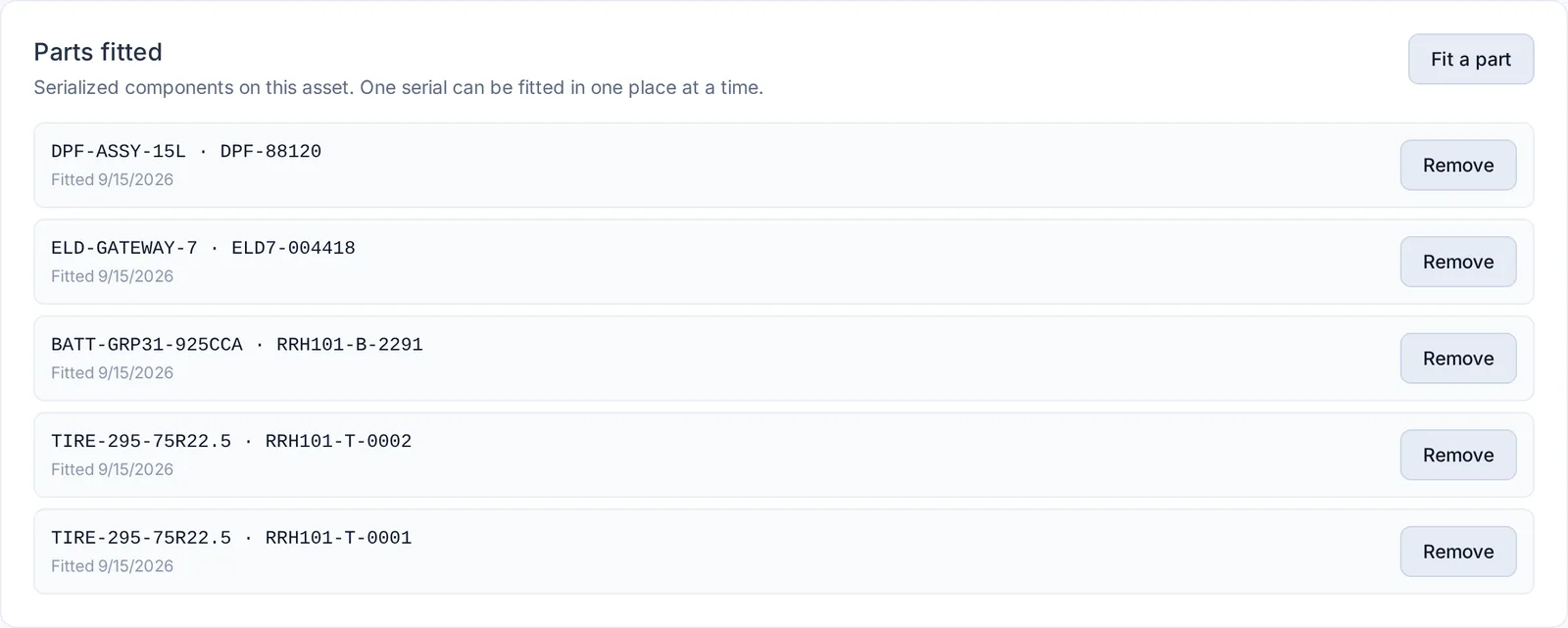
Parts are recorded as installed on a vehicle and later removed, with who fitted them and a certificate reference, so every asset carries its own component history and every serial its own history across vehicles. Each install and removal is fingerprinted, so the record can be checked later. Re-applying or re-importing a schedule never erases when a task was last done.
- Replaces
- Service spreadsheets, calendar reminders and receipt folders
- Produces
- A per-vehicle maintenance and component record
Repair costs per vehicle, per mile and per engine hour
Each work order carries its costs as separate lines: parts (a quantity at a unit price, or one amount, with the part's serial if you have it), labor (hours at an hourly rate, or one amount), an outside vendor's invoice with its number and the invoice itself attached, and anything else. Amounts are in your organization's currency and worked out exactly. A garage invoice that arrives after the job is closed is still added to that job.
A cost line is never edited or deleted. A wrong one is voided with a reason: it stays on the work order, struck through with who voided it and why, and drops out of every total. The right amount goes in as a new line.
The repair costs report shows what each vehicle cost in a period, split into parts, labor, vendors and other, and divides it by the miles or kilometers the vehicle's own readings show it covered, or by its engine hours. When the readings cannot tell, the figure is left blank rather than estimated. The report downloads as a CSV.
- Includes
- parts, labor, vendor and other cost lines on every work order · late invoices after completion · invoices attached to the work order · voiding with a reason, kept on the record · cost per vehicle per period · cost per mile or km and per engine hour from recorded readings · CSV export
Fuel and fuel economy for each vehicle
Each fill-up is logged against the vehicle: the date, the odometer, how much went in, what it cost, the fuel type (diesel, gasoline, DEF, LPG, CNG) and the station. Fuel economy is measured from one full tank to the next, so a partial fill counts toward the next full one, and a fill with no odometer reading is never guessed across.
Suspicious fills are flagged: more fuel than the vehicle's tank holds, economy far worse than that vehicle's own normal, and an odometer that went backwards. A fill is never edited or deleted. A wrong one is voided with a reason and stays on the record.
Your organization chooses its units: US gallons and miles per gallon, liters and UK miles per gallon, or liters and L/100 km. The fuel report shows each vehicle's volume, cost, economy and cost per mile or kilometer for a period, and downloads as a CSV.
- Includes
- fill-ups per vehicle · economy measured full tank to full tank · flags for overfills, poor economy and odometer errors · voiding with a reason, kept on the record · US gallons and mpg, liters and UK mpg, or liters and L/100 km · fuel report per vehicle and period · CSV export
Renewals, and each vehicle's own documents
Registration, insurance, road tax, the annual inspection, permits: each is a renewal with a date, chosen from a ready-made list, and it comes due like any service. The summary email lists what is due soon and what has expired, so a lapsed insurance certificate is not found at the roadside.
Each vehicle keeps its own papers: the insurance certificate, the registration document, the last inspection report. They are stored with the vehicle and open from its page.
- Includes
- ready-made renewals: registration, insurance, road tax, annual inspection, operator license, permits · due-soon and expired in the summary email · documents on each vehicle · in Fleet Lite
Driver records and license expiry
For each driver: the license class, where it was issued, and four dates: the license itself, the medical card, the Driver CPC and the next annual review of the driving record. Each date shows as in date, due soon or expired, and the summary email lists what to renew, with its own warning period, 30 days unless you change it.
Only the last four characters of a license number are kept, never the whole number. A scan of the license or the medical card is seen by owners, admins and that driver, and nobody else in the company.
- Includes
- license class and expiry · medical card · Driver CPC · annual MVR review date · last four characters of the license number only · scans seen by owners, admins and the driver · summary email · in Fleet Lite
- Not included
- driving record (MVR) pulls, license-check services, drug and alcohol testing records
Who drives which vehicle
Each vehicle has one current driver, assigned by an owner or admin. When someone else does the daily check, the vehicle's page offers to assign them; nothing changes until a manager says so.
Every assignment keeps its start and end, and the history cannot be edited. When a parking ticket or a damage claim arrives weeks later, look up the date and time and see who had the vehicle.
- Includes
- one current driver per vehicle · suggestions from the daily check · full history · "who had it at" lookup · each driver sees their own vehicles · in Fleet Lite
The US annual inspection, with its report and decal
The checklist is Appendix A to Part 396, the minimum periodic inspection standards: 15 components and 53 items in the regulation's own words. One item that does not meet the standard means the vehicle does not pass.
The record holds what 49 CFR 396.21 asks the report to show: who inspected, the motor carrier, the date, the vehicle, every component and its result, and the inspector's certification. An outside garage is recorded by name, and so, if you choose, is the inspector's qualification. Print the report, and for a vehicle that passed, a decal with the date, your company, where the report is kept and the certification. A passed inspection completes the vehicle's annual inspection renewal, so the next one comes due in twelve months.
- Includes
- Appendix A checklist, 53 items · not applicable where an item does not fit the vehicle · inspector's certification · outside inspector and optional qualification · printable report and decal · completes the annual inspection renewal · in Fleet Lite
- Not included
- inspector qualification checks: whoever inspects must be qualified under 49 CFR 396.19, and that stays your responsibility
Safety inspections with a brake test and a signed declaration
A UK safety inspection is recorded against its own checklist with where it was done, how braking was assessed — roller brake test, electronic braking performance monitoring, or a decelerometer — whether the vehicle was laden, the result and the brake efficiencies. The inspector declares the vehicle roadworthy only when the inspection has no open defects and the brake test passed; otherwise the declaration waits until its defects are certified, and it is signed with their name and time.
Fleet 25 to 500 not in Fleet Lite
Tires by wheel position, checked against the rules
Each tire is recorded at its wheel position, with its serial number and DOT date code, so its age is always known. Tread depth, and pressure if you take it, are recorded at each check. A tire that comes off is removed with a reason and stays in the vehicle's tire history; a wrong reading is voided with a reason, never edited.
Tires are checked against the rules of the country your organization operates in, which an owner or admin sets in Settings. In the United States, against 49 CFR 393.75: at least 4/32 inch on the front wheels of a truck, truck tractor or bus, 2/32 inch on the others, and no retreaded tires on a bus's front wheels. In Great Britain, against the 2021 rule: no tire aged ten years or more on a front steered axle of a goods vehicle over 3.5 tonnes, a bus or a coach, or on a minibus's single wheels, and a legible date code. Tires that break a rule are listed for the whole fleet in one place.
Your organization chooses its units: tread in millimeters or 32nds of an inch, pressure in bar or psi.
- Includes
- tires by axle, side and inner or outer wheel · serial and DOT date code, with the tire's age · tread and pressure readings · removal with a reason, kept in the tire history · checks against 49 CFR 393.75 and the British ten-year rule · a fleet list of tires needing attention · tread in mm or 32nds, pressure in bar or psi
Warranties on vehicles and the parts fitted to them
Record a vehicle's own warranties, such as powertrain or bodywork, and the warranty on each serialized part fitted to it. A warranty runs to an end date, a mileage or engine-hours limit, or both, whichever comes first. The limit is measured against the vehicle's latest odometer reading; with no reading, Cargovate says it can't tell rather than guess.
A work order shows which warranties may cover the repair, and a cost line for a part still under warranty is flagged. A claim is recorded against the warranty for that repair, with the supplier's reference, and then its outcome: accepted with the amount recovered, rejected with the reason, or withdrawn. The outcome is final. Cargovate records claims; you send them to the supplier as you do today. Warranties about to end appear in the maintenance summary, using the same lead times as service reminders.
- Includes
- vehicle warranties · warranties on fitted serialized parts · an end date and/or a mileage or engine-hours limit · "may be under warranty" on work orders · claims per repair, with the amount recovered · warranties ending soon in the maintenance summary · a wrong entry voided with a reason, never edited
Who is doing each job
Each work order can be assigned to one person: a member of your team, or an outside garage by name. An owner or admin assigns or reassigns any job. A mechanic can take an unassigned job for themselves, or hand back one that is theirs.
Every change stays on the job's record: who it was assigned to, by whom, and when. Once a job is completed, who held it is final, and the completion is filled in with their name.
The work orders list shows open jobs by who holds them, so a mechanic opens Assigned to me to see their own. Nothing is emailed.
- Includes
- one assignee per work order: a team member or an outside garage · assign, reassign and unassign by an owner or admin · take and hand back by a mechanic · the assignment history on every job · Assigned to me, Unassigned, Outside garages and All open lists
Vehicle positions from the telematics you already run
Vehicle positions arrive from telematics such as Motive (built from Motive's published reference and not yet run against a live Motive account) or from your own GPS trackers, each stored with the age of its fix, on the same platform as the maintenance record. Fleets that also move freight get shipment tracking, custody and alerts from the same platform — see shipment visibility.
From Motive, odometer and engine-hour readings also feed the maintenance schedules of the vehicle the device is linked to. A reading lower than the last one is rejected rather than resetting the count.
Short videos
By trade
The same records, in your trade's words, with a starter workbook that already lists the services you usually do: Towing & recovery · Septic & portable toilets · Plumbing, electrical & HVAC · Construction & equipment · Landscaping. Or start from the blank fleet workbook (Excel).
Questions
Is there a plan for a small fleet?
Yes — Fleet Lite, $49 a month for up to 10 vehicles and pieces of equipment, with any number of users. It covers inspections, defects, preventive maintenance, work orders, fuel and repair costs. For bigger fleets, Fleet 25 ($119 a month), Fleet 50 ($249) Fleet 100 ($449), Fleet 250 ($899) and Fleet 500 ($1,599, up to 500) add tires, warranties, technician assignment and telematics. Moving up keeps every record. See pricing.
Can maintenance be scheduled by mileage or engine hours?
Yes — odometer miles or kilometers, engine hours or cycles, as well as time. The interval counts from the reading at the last service. Readings can be typed in, imported from a spreadsheet or sent by Motive (whose connection is checked with you during onboarding); with no service recorded yet, the count starts from the reading when the schedule was applied.
Is the service history kept when a schedule is re-applied?
Yes. Re-applying or re-importing a schedule keeps when each task was last completed, and a completed work order cannot be reopened.
Does it work in miles?
Yes. Distance is set in miles or kilometers for your organization, and organizations in the US and the UK start in miles. Readings and intervals are entered and shown in that unit.
Which vehicles and equipment can it track?
Road vehicles such as vans, trucks and trailers, and plant equipment such as forklifts, each with a plate or unit number, make, model and serial, and its own odometer or engine-hour readings.
Can we record which parts are fitted to each vehicle?
Yes. Parts are installed on and removed from an asset, giving each vehicle its own component history.
Can we import our fleet list and service records?
Assets, fitted parts, maintenance tasks, usage readings, work orders, and each schedule's last-done date and reading import from a spreadsheet or ERP export, previewed row by row. See moving your data.
Does it send reminders when a service is due?
Yes. A schedule shows as due soon inside your lead time, an overdue service raises an alert straight away, and a daily or weekly summary lists everything that needs attention. They go to the email address or webhook you set for your organization.
Does it do driver vehicle inspection reports (DVIR) and daily walkaround checks?
Yes. Drivers complete the US driver vehicle inspection report items or the UK daily walkaround check on their phone or at a shared yard tablet, one item at a time. Defects are assessed by an owner or admin, repairs are certified on the work order, and the next driver acknowledges them.
Does every driver need their own phone?
No. Set up a tablet in the yard and give each driver a badge. They scan the badge to sign in, scan or type the vehicle, do the check, and the record carries their name. The tablet keeps no one's login and signs the driver out after a set idle time.
Can drivers add photos of a defect?
Yes. A driver takes photos of a defect with the camera during the check, on their phone or at the yard tablet, and whoever certifies the repair can add a photo of it. Each photo becomes part of the defect's record; an owner or admin can remove one, with a reason that stays on the record.
Can a defect report be changed after it is written?
No. Each step is a new entry linked to the one before it, the application's database account cannot alter or delete them, and the defect's history shows whether the record is intact.
Does using Cargovate make us compliant?
No. It keeps the records that the DVSA guidance and 49 CFR 396.11 and 396.13 ask a record to hold, and it will not let a repair be closed without a certification. Running the checks and acting on them is still your operation's responsibility.
Does it track repair costs?
Yes. Parts, labor, outside vendors and other costs go on each work order, also after it is completed, and the repair costs report shows each vehicle's spend for a period and per mile, kilometer or engine hour. Purchase orders, parts inventory, budgets and markup are not part of it.
Can we assign work orders to a mechanic or an outside garage?
Yes. Each work order is assigned to one team member or an outside garage. Mechanics see their own jobs under Assigned to me in the app; there is no email or notification. Crews, time clocks and a separate technician login are not part of it.
Does it track fuel and fuel economy?
Yes. Fill-ups are logged per vehicle, economy is measured from one full tank to the next, and suspicious fills are flagged. It works in US gallons and mpg, liters and UK mpg, or liters and L/100 km. Fuel-card imports are not available yet; fills are entered in the app.
Does it check tire tread depth and tire age?
Yes. Each tire is recorded at its wheel position with its DOT date code and tread readings. In the United States it flags tread below 49 CFR 393.75's minimums (4/32 inch on the front wheels of a truck, truck tractor or bus, 2/32 inch elsewhere); in Great Britain it flags a tire ten years or older on a front steered axle. The rules follow the country your organization operates in, set by an owner or admin in Settings; the same country picks the daily vehicle check (DVIR or walkaround). Rotations and tire inventory are not part of it.
Does it track warranties and warranty claims?
Yes. Warranties on vehicles and on serialized parts fitted to them, by end date and/or mileage (or engine hours), whichever comes first. A work order shows when a repair may be covered, and a claim is recorded per repair with its outcome and the amount recovered. Cargovate records claims; it does not send them to suppliers.
Is it an aviation airworthiness record?
No. Cargovate keeps an operator's maintenance history; it is not a regulatory airworthiness or certification record and should not be used as one.
Seen enough?
See the plans and prices